
Vuejs 有提供許多內鍵方法如: v-text、v-html 來處理 HTML 格式的文章,但有時並無法滿足版面的需求。
Vuejs 原生方法 v-html
<script setup>
const htmlString = '<p>Hello <strong>World</strong></p>'

</script>
<template>
  <div v-html="cleanText"></div>
</template>
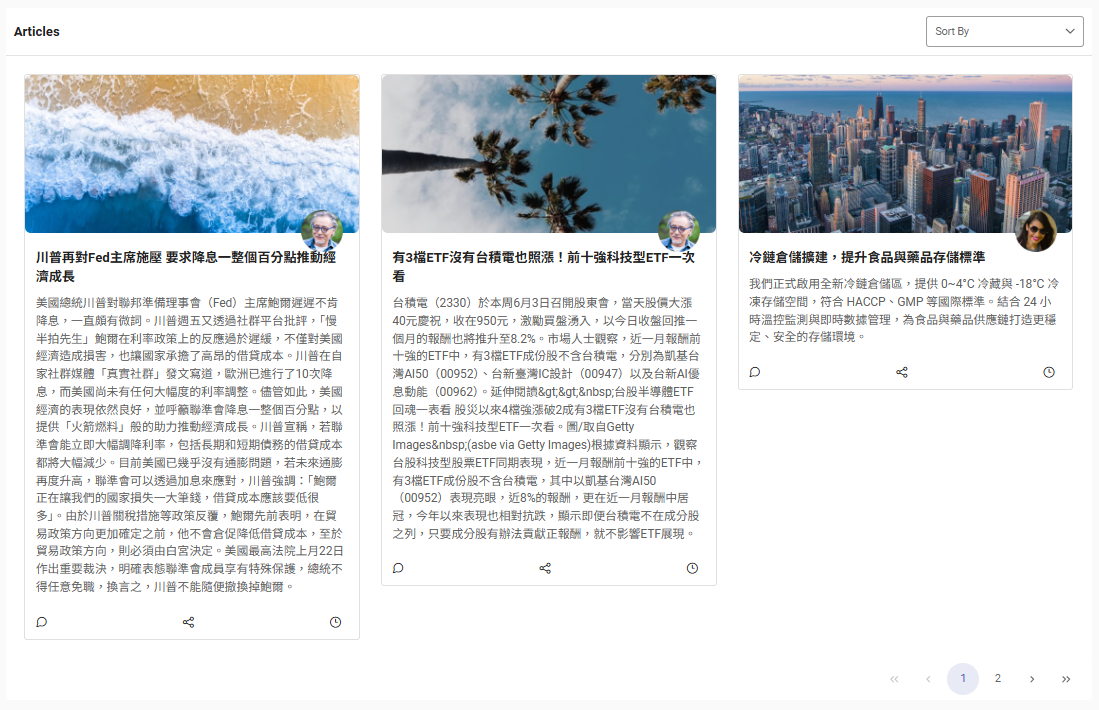
網頁產出的版面有可能會是如下,整個版面都被破壞了。

一般方法:stripHtmlTags
在 Vue.js 中,如果想 移除 HTML 標籤(即清理 innerHTML 或不讓 HTML 被渲染出來),可以在組件中使用以下方法:
<script setup>
const htmlString = '<p>Hello <strong>World</strong></p>'
const stripHtmlTags=(text) =>{
  if (!text) return ''
  return text.replace(/<[^>]*>/g, '')
}
</script>
<template>
  <div>{{ stripHtmlTags(cleanText) }}</div> <!-- Output: Hello World -->
</template>
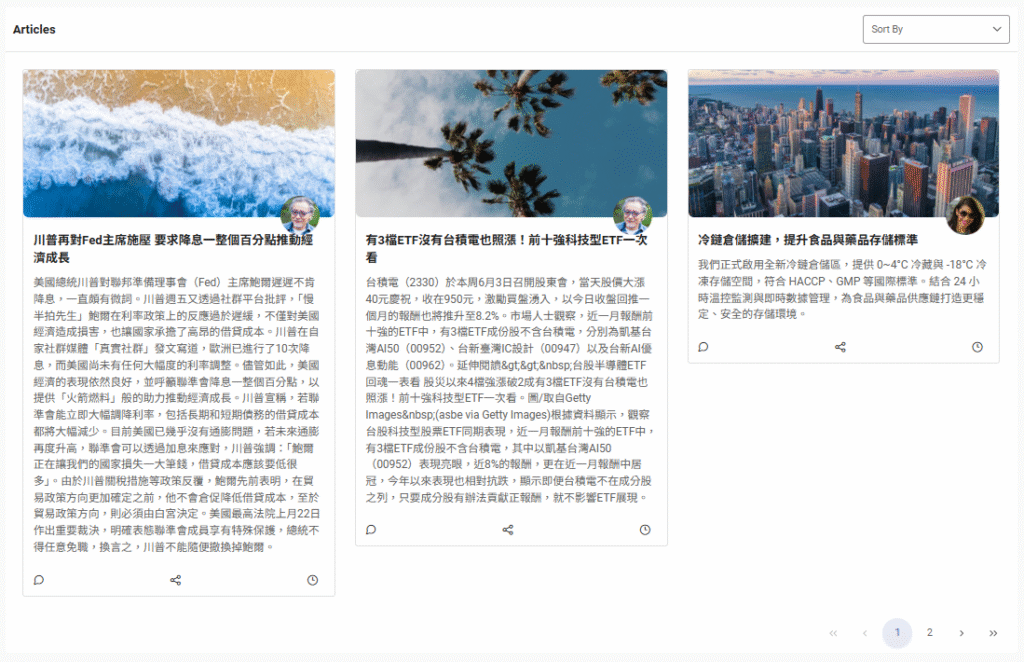
網頁產出的版面就會變成如下,整個版面是不是好很多了。
公用方法:stripHtmlTags
接下來可以建立一個 公用方法 來 移除 HTML 標籤,可以使用以下方法來重覆使用:
// utils/stripHtml.js
export function stripHtmlTags(text) {
  if (!text) return ''
  return text.replace(/<[^>]*>/g, '')
}
使用方式一:在組件中直接匯入使用
<script setup>
import { stripHtmlTags } from '@/utils/stripHtml'

const htmlString = '<p>Hello <strong>World</strong></p>'
const cleanText = stripHtmlTags(htmlString)
</script>

<template>
  <div>{{ cleanText }}</div> <!-- Output: Hello World -->
</template>
使用方式二:註冊成全域方法(例如main.js ,若在 Laravel 則是 app.js)
// main.js
import { createApp } from 'vue'
import App from './App.vue'
import { stripHtmlTags } from './utils/stripHtml'

const app = createApp(App)

app.config.globalProperties.$stripHtml = stripHtmlTags

app.mount('#app')
然後在組件中這樣用:
<script setup>
const htmlString = '<p>Hello <em>Vue</em></p>'
</script>

<template>
  <div>{{ $stripHtml(htmlString) }}</div>
</template>
若在 <script setup> 中使用 Composition API,要使用 getCurrentInstance() 取得 app.config.globalProperties 才能取到 $stripHtml。
Vue 3 專案風格 Composable
接著為了整合 Vue 3 專案風格 Composable 檔案,下面的程式碼可直接加入的 composables 資料夾
// composables/useStripHtml.js

export function useStripHtml() {
  const stripHtml = (text): string => {
    if (!text) return ''
    return text.replace(/<[^>]*>/g, '')
  }

  return {
    stripHtml
  }
}
範例用法(script setup)
<script setup>
import { useStripHtml } from '@/composables/useStripHtml'

const { stripHtml } = useStripHtml()

const raw = '<p>Hello <strong>Vue</strong> World!</p>'
const clean = stripHtml(raw)
</script>

<template>
  <div>{{ clean }}</div> <!-- Output: Hello Vue World! -->
</template>
進階版本:使用 DOMParser 安全清除HTML中的標籤
export function useStripHtml() {
  const stripHtml = (html): string => {
    if (!html) return ''
    const doc = new DOMParser().parseFromString(html, 'text/html')
    return doc.body.textContent || ''
  }

  return { stripHtml }
}
這種方式更安全,能處理例如 <script>、<style> 等不應顯示的 HTML 內容,推薦用於未知來源的輸入資料。
支援 reactive ref 和純 string
// composables/useStripHtml.js
import { isRef, computed } from 'vue'

export function useStripHtml(input) {
  const stripHtml = (text) => {
    if (!text) return ''
    const doc = new DOMParser().parseFromString(text, 'text/html')
    return doc.body.textContent || ''
  }

  const plainText = computed(() => {
    if (!input) return ''
    return stripHtml(isRef(input) ? input.value : input)
  })

  return {
    stripHtml,
    plainText
  }
}
使用方式 1:Reactive 處理
<script setup>
import { ref } from 'vue'
import { useStripHtml } from '@/composables/useStripHtml'

const html = ref('<h1>Hello</h1> <p>Vue <strong>3</strong></p>')
const { plainText } = useStripHtml(html)
</script>

<template>
  <div>{{ plainText }}</div> <!-- Output: Hello Vue 3 -->
</template>
使用方式 2:立即處理字串
<script setup>
import { useStripHtml } from '@/composables/useStripHtml'

const { stripHtml } = useStripHtml()
const clean = stripHtml('<span>Static <em>text</em></span>')
</script>

<template>
  <div>{{ clean }}</div> <!-- Output: Static text -->
</template>
這樣就有一個完全支援 reactive 和非 reactive 使用場景的 Composable,純 JavaScript,不依賴 TypeScript 特性。