
使用此軟體套件 spatie/laravel-permission 可以輕鬆地在 Laravel 應用程式中為使用者新增權限或角色。
一、安裝
- 此軟體套件 spatie/laravel-permission 發布了一個 config/permission.php 檔案。如果已經有一個同名文件,則必須重新命名或刪除它。可以透過 Composer 安裝此軟體包:
composer require spatie/laravel-permission2. 服務提供(Service Provider) : Spatie\Permission\PermissionServiceProvider::class 將自動註冊
3. 於 bootstrap/app.php 的 Middleware 作 ‘role’、’permission’ 及 ‘role_or_permission’ 下列的設定。
->withMiddleware(function (Middleware $middleware) {
	// spatie/laravel-permission
	$middleware->alias([
		'role' => \Spatie\Permission\Middleware\RoleMiddleware::class,
		'permission' => \Spatie\Permission\Middleware\PermissionMiddleware::class,
		'role_or_permission' => \Spatie\Permission\Middleware\RoleOrPermissionMiddleware::class,
	]);
})4. 使用以下命令將遷移檔(migration: xxx_xx_xx_xxxxxx_create_permission_tables) 複制到 database\migrations 目錄,和複制設定檔到 config/permission.php:
php artisan vendor:publish --provider="Spatie\Permission\PermissionServiceProvider"5. 清除配置快取 (Clear your config cache)
 php artisan optimize:clear
 # or
php artisan config:clear6.執行遷移:發布並配置好配置和遷移後,可以透過執行以下命令為該套件建立資料表(Table):
php artisan migrate7.在使用者模型中添加必要的特徵(Trait):
<?php

namespace App\Models;
use Spatie\Permission\Traits\HasRoles;

class User extends Authenticatable
{
    use HasRoles;
    //....
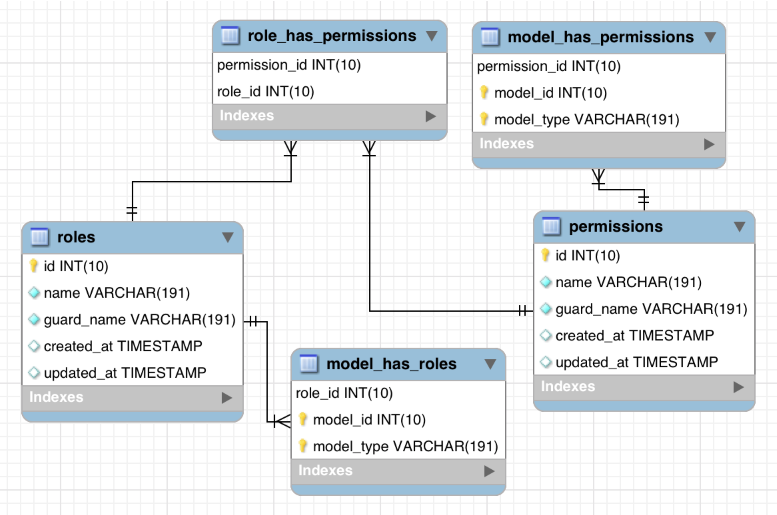
}8. 相關權限資料表(Permission table) ER-Model 如下:
二、建立簡單的權限與身份
1.建立權限
use Spatie\Permission\Models\Role;
use Spatie\Permission\Models\Permission;

$role = Role::create(['name' => 'writer']);
$permission = Permission::create(['name' => 'edit articles']);2.為角色指派權限
$role->givePermissionTo($permission);
$permission->assignRole($role);3.將權限同步到角色
$role->syncPermissions($permissions);
$permission->syncRoles($roles);4.刪除角色的權限
$role->revokePermissionTo($permission);
$permission->removeRole($role);5.取得使用者權限
HasRoles 特性將 Eloquent 關係新增到User的模型中,可以直接存取或用作基本查詢:
// get a list of all permissions directly assigned to the user
// 取得直接分配給使用者的所有權限的列表
$permissionNames = $user->getPermissionNames(); // collection of name strings
$permissions = $user->permissions; // collection of permission objects

// get all permissions for the user, either directly, or from roles, or from both
// 取得使用者的所有權限,可以直接獲取,也可以透過角色獲取,或透過兩者同時獲取
$permissions = $user->getDirectPermissions();
$permissions = $user->getPermissionsViaRoles();
$permissions = $user->getAllPermissions();

// get the names of the user's roles
$roles = $user->getRoleNames(); // Returns a collectionHasRoles 特性也為User的模型新增了 role 和 withoutRole 範圍,以將查詢範圍限制為某些角色或權限:
// Returns only users with the role 'writer'
// 僅傳回具有「writer」角色的用戶
$users = User::role('writer')->get();

// Returns only users without the role 'editor'
// 僅傳回不具有「編輯者」角色的用戶
$nonEditors = User::withoutRole('editor')->get();

// Returns only users with the permission 'edit articles' (inherited or directly)
// 僅傳回具有「編輯文章」權限的使用者(繼承或直接)
$users = User::permission('edit articles')->get();

// Returns all users without the permission 'edit articles' (inherited or directly)
// 傳回所有沒有「編輯文章」權限的使用者(繼承或直接)
$usersWhoCannotEditArticles = User::withoutPermission('edit articles')->get(); 由於角色和權限模型是從 Eloquent 模型擴展而來的,因此也可以使用基本的 Eloquent 呼叫:
$allUsersWithAllTheirRoles = User::with('roles')->get();
$allUsersWithAllTheirDirectPermissions = User::with('permissions')->get();
$allRolesInDatabase = Role::all()->pluck('name');
$usersWithoutAnyRoles = User::doesntHave('roles')->get();
$allRolesExceptAandB = Role::whereNotIn('name', ['role A', 'role B'])->get();Command
它提供一些的 Artisan Commands ,例如在控制台中顯示角色和權限
php artisan permission:show可以顯示出所有權限的列表
>php artisan permission:show
Guard: web
+-------------------+---------------+----------------+-------------+
|                   | ArticleAdmins | ArticleAuthors | SuperAdmins |
+-------------------+---------------+----------------+-------------+
| createArticles    |  ·            |  ✔             |  ·          |
| deleteArticles    |  ·            |  ✔             |  ·          |
| publishArticles   |  ✔            |  ·             |  ·          |
| unpublishArticles |  ✔            |  ·             |  ·          |
| updateArticles    |  ·            |  ✔             |  ·          |
+-------------------+---------------+----------------+-------------+